Pages

Showing posts with label sofwware. Show all posts

Friday, January 24, 2014

How to Hack a Computer by Setting up Pro Rat Server

How to Hack a Computer by Setting up Pro Rat Server


Hi guys..today i am going to show you how to set up ProRat and how to hack a computer using it. Well, i am going to finish up RAT setup articles with this. I will give the counter measures in my next article. As i haven’t written any articles on direct connection Trojans, I decided to write the one on PRORAT.
If you are new to RATing, it is strongly recommended to read my previous articles which give you allthe basic and advanced stuff about RATs.


Hack Remote Computers using EXTREME RAT
Trojans and RATs- Know The Facts
DARK-COMET v4.2 RAT TUTORIAL

procedure to setup ProRat

STEP 1. First of all Download ProRat from here. Once it is downloaded extract it. A password prompt will come up. Enter the password.The password  "pro".

STEP 2. Open up the program and You should see the following window.


STEP 3. Click on the "Create" button in the bottom. Choose "Create ProRat Server".

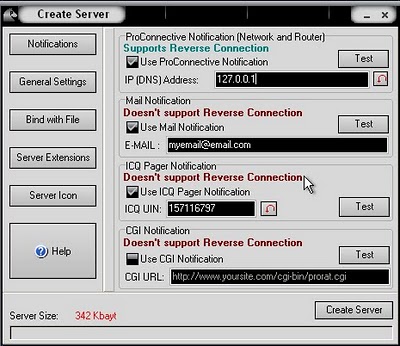
STEP 4. Next put your IP address so the server could connect to you. You need not enter your IP address manually, you can do this by just clicking on the little arrow. it automatically fills your IP address.
Next put in your e-mail so that when and if a victim gets infected it will send you an email.

STEP 5. Now Open General settings. This tab is the most important tab. In the check boxes, we will choose the server port the program will connect through, the password you will be asked to enter when the victim is infected and you wish to connect with them, and the victim name. As you can see ProRat has the ability to disable the windows firewall and hide itself from being displayed in the task manager. Just follow the steps as shown in the figure.

STEP  6. Click on the Bind with File button to continue. Here you will have the option to bind the trojan server file with another file. You can select an image, text file or pdf file, So as to make the victim trust your file.

STEP  7. Click on the Server Extensions button to continue. Here you choose what kind of server file to generate.    I prefer using .exe files.

STEP  8. Click on Server Icon to continue. Here you will choose an icon for your server file to have. The icons help mask what the file actually is.

STEP  9. After this, press Create server, your server will be in the same folder as ProRat. Start giving this file to your victim. When the victim double click the file, his computer will be in your control.

STEP  10. Now the hacker has lot of options to choose from. He can do many funny things with the victim’s computer.


NOTE: In this tutorial, i put the victim’s IP as 127.0.0.1 as i am testing it on my computer. Inorder to hack a remote computer, you need to get the IP address of your victim. If you dont  know how to find an IP address, you can read my article on finding out remote IP address from here.

Wednesday, January 22, 2014

HDD Regenerator 2014 Free Download

HDD Regenerator 2014 Free Download

Hard disk drive (HDD) regenerator 2014 free download is hard disk repairing tool that will repairs physical bad sectors from hard disc drive easily. Hard disk drive regenerator is fully compatible with all OS of Microsoft windows. HDD regenerator is best bad sector removing tool that will provides the way to access data and information easily. HDD regenerator is powerful hard drive repairing solution that can remove bad sectors immediately. HDD regenerator has the ability to recover your personal and important documents after repairing hard disk drive. HDD regenerator will scan hard disk drive and eliminates physical damages right from computer hard drive.
HDD regenerator can also use for laptop, notebook, tablet and desktop computer hard drives as well. HDD regenerator is fully compatible with all operating systems released from Microsoft windows. These OS are windows 8.1, windows 8, windows 7, windows vista and windows XP as well. HDD regenerator is best tool used to remove bad sectors and physical drive errors instantly. Norton partition magic is also most powerful competitor of HDD regenerator software. HDD regenerator provides multiple features at same time. The first feature is repairing physical bad errors from hard disk drive and then recovers important data and documents from those damage hard disk drives.

HDD Regenerator 2014 Features:


  • Repair magnetic errors
  • Repair bad sectors
  • Faster problem detection
  • Repair hard drive without data lose
  • Repair missing and corrupted data
  • Make unreadable data into readable form
  • Easy to use
  • User friendly graphics interface
  • Unformatted and unpartitioned hard drive support
  • FAT, FAT32 and NTFS supported
  • Windows compatibility
  • Start repairing hard drive through boot from CD
  • Multi hard drive support at same time
  • Faster scanning will save user's valuable time
  • Automatic resume scanning
  • Hard drive statistics
  • Instant data recovery
  • 60% probability of saving hard drives

Application Details

Size: 7.93 MB
Version: 2014
License: Trial
Platform: Windows
Developer: dposoft
HDD Regenerator 2014 Free Download

Advanced System Optimizer Free Download

Advanced System Optimizer Free Download

Advance system optimizer (ASO) 3.5 free download is optimization tool that will boosts the speed of computer windows. Advance system optimizer free download trial version is fully functional and fully compatible with all operating system versions of Microsoft windows. Advance system optimizer is smart, comprehensive and most powerful system software suite that is able to increase system speed up to 50%. Advance system optimizer is simple, fast and easy to use optimization tool that will works perfectly into windows 7, windows 8, windows vista and windows XP as well. Advance system optimizer was released by system tweaks that also release registry clean pro, advance driver updater, advance disk recovery, advance system protector, disk speedup and lots of others.
Advance system optimizer has multiple features software so it can be called all in one system optimizing tool as well. Advance system optimizer has launched its version 2 in 2004 for the first time ever. The success of Advance system optimizer 2 can be calculate through its popularity anddownloads. According to the developer the second version of Advance system optimizer has up to 1 million downloads from all over the world. After it the version 3 of Advance system optimizer is able to make your PC error free, secure, protected, faster, optimized and clean as well. Tune Up utilities and AVG PC Tune and Win utilities Professional are the best competitors of Advanced system optimizer.

Smart PC Care:

Smart PC care is the most powerful part of Advance system optimizer because it allows the user to take multiple actions in same time. These several tasks are file defragmentation, registry cleaning and file cleaning as well. This feature makes your system faster with taking multiple required actions at a same time. O&O Defrag Professional is most recommended disk defragmentation software for windows.

Game Optimizer:

Game optimizer is designed especially for PC games that want to play games rather than any other work. Advance system optimizer includes game optimizer that will relocates available system memory and reserve this for running heavy games. This will also provides a virtual desktop that will no longer runs any other task except games. This powerful tool makes computer games running on your PC.

Driver Updater:

This is most required and most recommended tool provide from Advance system optimizer to keep system drivers updated to the latest version. The latest drivers of computer hardware must optimize the running speed and acceleration as well. Driver database includes soundMax, Real AC97 audio, RealTek high definition audio driver and Intel extreme graphics driver.This tool alerts the user when any driver update is available and expired drivers can be automatically updated to latest version. Driver pack solution, DriverMax, Uniblue driver scanner, Easy driver professional and Driver identifier are also available as free download.

System Protector:

System protector tool will works like a anti spyware that must protect the computer from spyware and malware. Advance system optimizer especially adds this new feature to provide protection and security to its consumers for keeping the PC away from malicious and suspicious runs. This tool will helps you for cleaning, quarantining, scanning for threats and other dangerous worms as well. Malware bytes anti-malware is best anti-spyware software.

Disc Optimizer:

Disk optimizer tool lets the user to create complete disk fragmentation. This will increase the boot and loading speed of operating system with addition of running multiple applications in one time. This tool will also provides more free space after arranging the files and folders into sequential order. Disc optimizer is best tool to increase the running, restart, loading, booting and other speed performance of PC.

PC Fixer:

PC fixer is new tool that is included in Advance system optimizer 3.5 version for the first time. This tool easily finds the recommended list of actions right from settings and control panel as well. It automatically finds the perfection of specific programs like sound settings, display settings, user settings and others.

Registry Cleaner:

Advance system optimizer 3.5 introduces the new, updated and redesigned version of registrycleaner that will finds the problems and issues in system registry. Registry cleaner will fix the issues such as removing missing and duplicate entries, resolving corrupted entries, clean the registry entries to load the OS fast, fixing the bad entries and many others. You can also try PC Tools registrymechanic for multiple features.

Undelete:

Undelete is powerful data recovery tool that will finds the deleted items right from memory cards, USB flash drives and local hard disk drives as well. Undelete automatically finds the deleted files and folders and provide an easy and simple way to recover these deleted files instantly.

System Cleaner:

Advance system optimizer will know the value of user privacy and identity as well. System cleaner will automatically identifies those apps, files and registry entries that may harm your identity, security, privacy and data protection. This tool will help to locate those dangerous files and then easily remove them from computer immediately.

Registry Optimizer:

Registry optimizing tool will make the performance of computer and windows as fast as possible. It takes some needed actions after user confirmation to remove bad entries, missing entries, duplicateentries, corrupt entries and other unusable entries as well. This will also removes the gap and fragments right from windows registry editor to make its faster.

Uninstall Manager:

This is an advanced and powerful tool that will lets you to remove or delete applications, software or programs from windows. Uninstall manager is revised and redesigned version that has easy to use interface with simple and easy steps completion. You can easily uninstall multiple programs without opening add or remove programs from control panel. Revo uninstaller pro also works professionally.

Disk Explorer:

Disk explorer is advanced tool of Advance system optimizer that will lets the user to navigate to any of specific drive, folder and file to identify the size, date and other details. This tool will also provide advanced pie chart that tells the exact details in different coloring schemes. This will works like TreeSize Professional software for windows.

Memory Optimizer:

Memory optimizer will provides complete details in colorful graph that includes used memory, total memory and free available memory with details of resources. This tool of Advance system optimizer will works like windows task manager that will also provide details of system memory but very shortly then memory optimizer.

Privacy Protector:


Privacy protector will protect your privacy and identity from hackers, seekers, and other dangerous attackers that may harm your privacy and identity. Privacy protector will finds the traces, logs, cookies and other credential information based files from the windows. Most users using CCleaner for doing this job. After finding just remove them one by one of completely to stay safe and clean.

Secure Delete:

Advance system optimizer includes secure delete feature that is used to delete specific important and valuable data with protection. Secure delete will delete targeted files and folders without having to recover them with data recovery tools. The files and folders deleted with secure delete tool will be permanently deleted and can't be recover with power data recovery, r-studio data recovery, Paragon back and recovery, get data back, memory card data recovery software and others.

Disk Tools:

Disk tools will optimize the hard disk logical drives without losing the data in sectors. Advance system optimizer provides disk tools to remove the bad sectors from local hard disk and make it running faster than ever before.

Duplicate File Remover:

Duplicate file remover will search for duplicate files and folders. Advance system optimizer has introduced duplicate file remover to prevent the windows to store multiple files with same specifications. This will provide more free space with deleting duplicate files from computer.

Startup Manager:

Advance system optimizer introduce start up manager tool that will lets the user to customize the default and custom programs that are loading at windows start up. User can simply remove those heavy and unusable programs from the start up program list and makes your windows booting faster than ever. CCleaner also includes startup manager.

System and Security Advisor:

Advance system optimizer has included system and security advisor that will gives you tips for taking recommended actions. This powerful tool will always trying to optimize the performance of PC and increase it with taking multiple actions.

Secure Encryptor:

Secure encryption is most recent term used to encrypt data and files immediately. The encrypted data can be accessible without the permissions of admin. If your data was hacked by theft then don't be worry because this encrypted data can't accessible even copy to anywhere.

Application Details

Size: 14.37 MB
Version: 3.5
License: Shareware
Platform: Windows
Developer: Sys-Tweak
Advanced System Optimizer 3 Free Download

3 Best Start Menu Programs For Windows 8

3 Best Start Menu Programs For Windows 8

There are 3 most popular programs using mostly as windows 8 start menu. The first one is Window 8 Start Menu by Pokki, second is Window 8 Start Menu by IOBit and third one is Start8 for windows 8 from star dock as well. These 3 best and simple applications are easy to download and easy to install into windows 8. Windows 8 and windows 8.1 doesn't includes any start menu just like windows 7, windows vista and windows xp as well. Mostly consumers of windows 8 are just want start menu button back to windows 8 operating system. Microsoft release windows 8 especially for tablets, notebooks and laptops.
Windows 8 designed for touch books to quickly access the apps right from the desktop. Windows 8 all versions require start menu to make your windows like as windows vista, windows 7 and windows XP. Windows xp, vista and 7 include the start button and after that Microsoft releases windows 8 without start menu button. You can install these start menu buttons into any version of windows 8. These versions are windows 8 ultimate, windows 8 professional, windows 8 starter, windows 8 home edition, windows 8 home premium and others. These windows 8 start button programs also supports 32-bit and 64-bit operating system environments in windows 8.

1. Window 8 Start Menu by Pokki

Windows 8 start menu button developed and released by Pokki to provide start menu button to the users of windows 8 without any cost. The start menu button for windows 8 by pokki is completely free and don't requires any registration. It gives you access to the control panel, software, power buttons and many other customized shortcuts of different apps. The start menu button is fully customizable and provides you simple and easy steps to add and remove apps and favorite website bookmarks as well.

This start menu will looks like a smart phone and it integrates some extra apps, games and bookmarks of favorite websites. The search bar exists at the top of start menu which allows you to easily search and after navigate to targeted files instantly. Apps show small thumbs to easily get access without checking their names. The pinning of apps, games and bookmarks is simple, easy and accessible.

Previously pokki provides hundreds of games and applications for various platforms. Now they develop apps and games especially for windows PC and can be pinned into start menu of windows 8 easily. Pokki's windows 8 start menu allows this start menu to organize and manage these apps on PC easily. FarmVille 2 and Pixsta are the most popular apps from pokki. You can download more apps from pokki app store.

Application Details

Size: 803 KB
License: Freeware
Platform: Windows
Developer: Pokki
Window 8 Start Menu by Pokki

2. Window 8 Start Menu by IOBit

Windows 8 start menu developer and release by IOBit Corporation that also release advance system care previously for windows users. The Start menu button and tools by IOBit are just amazing because the look and style of this start menu button is same as windows 7. Everything is settled on perfect position at start menu. If you have used windows 7 then you must know about windows 7start button. Many of Windows 8 users want to have start menu button in windows 8 just like as used in windows 7.

Windows 8 integrates metro style screen as alternative of start menu screen. There are lots of users that doesn't like windows 8 metro style screen. They want to come start menu button back to windows because they have love with start menu button. Windows 8 start menu by iobit is smart, intelligent and most powerful tool that will brings both windows 8 start button and start menu as well.

This smart tool will also provide you the feature to permanently skip the metro style screen with simple and easy steps. This will make the windows 8 to boot directly to the desktop with skipping metro screen page. It's the best windows 8 starts button and start menu than its competitors.

Application Details

Size: 6.71 MB
License: Freeware
Platform: Windows
Developer: IOBit
Window 8 Start Menu by IOBit

3. Start8 For Windows 8 by Stardock

Windows 8 start menu button released and developed by stardock that is world's best and most popular windows 8 start menu button than its competitors. Start8 is the name of this small application that brings the start menu and start button back in all versions of windows 8. This tool will adds a beautiful start button into windows 8 that is the root for accessing start menu programs. Start8 is simple, revised, redesigned and fully customized start menu button available as free trial period. This will replace metro style screen with windows 7 style start menu and button in your windows 8 OS version.
Start8 makes your windows 8 to boot directly to the desktop without loading metro style screen. You can easily pin or unpin favorite apps into start 8 start menu of windows 8. Windows 8 was shipped without start menu button and Microsoft introduces metro style screen pages for the first time ever in the history of Microsoft windows. Stardock developed start menu button for windows 8 after searching on user's feedback and comments. Most of those wants start button back because they are feeling sad after opening of metro style pages. They also bored from logon screen of windows 8 and want to skip this screen to the desktop.

Features of Start 8 for windows 8:


  • Unified Search bar
  • Start menu same as windows 7
  • Pin and unpin apps easily
  • 1 click access to pictures, videos, music and documents
  • 1 click shutdown, restart, stand by, log off
  • Original windows 8 menu is accessible
  • Easy and simple to use
  • Matching colors with taskbar
  • Customize start button
  • Boot directly to desktop
  • More...

Application Details

Size: 7.12 MB
License: Shareware
Platform: Windows
Developer: Stardock
Start8 For Windows 8 by Stardock